Choose something real.
Turn “I want to get better” into a small result you can make, hear, write or show.
A practical guide by Brian van Veen
Build a personal learning plan and a Notion workspace with AI. For self-taught makers learning a complex skill: turn your goal into focused exercises, keep track of your attempts and choose what to practise next.
56-page English PDF · 8 chapters + practical appendices · Notion workspace link
Preview: the first 6 pages of the expanded English edition. No email needed.

For the curious. The creative. The still-figuring-it-out.
Another saved video can wait. Choose a small piece of your own work, ask a useful question, and give the next attempt a place in your week.
Turn “I want to get better” into a small result you can make, hear, write or show.
Ask a connected AI assistant to create your approved learning plan and workspace in Notion. Follow the manual route if a working connection is unavailable.
Do the exercise, record what happened and ask AI to update your next step. Keep your work and progress together in Notion.
Inside the book
Follow two fictional learners: Robin develops a music-production practice, while Sam learns to build a small web app. See the whole route: a filled-in prompt, an example answer, a Notion plan, a first exercise and a review. Then see how Brian used the same method to make this book.
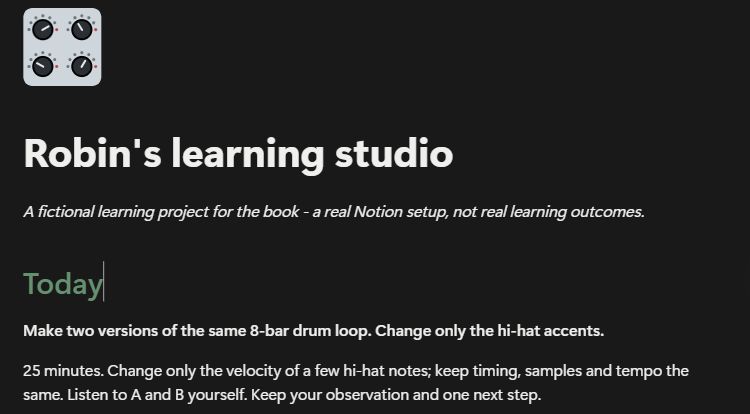
A starting point you can use
A public Notion template with a place for your goal, exercises, sources and reviews. Duplicate it into your own account and make it yours.
Open the Notion template →Explore a selected public reader edition of Brian's book project: the goal, decisions and process behind the guide you are reading.
Look behind the scenes →The PDF takes you through asking AI to build and maintain the environment. It also includes a manual fallback and the code for Sam's programming example.
Read the opening 6 pages →About the author

I always have ideas. Things I want to make, subjects I want to explore and skills I want to learn. Music production is a big part of that. But with so many ideas at once, I also lose track. I start one thing, jump to another and forget what I originally set out to do.
I was often busy, but I couldn't always point to a clear goal or see the progress I was making. I needed a way to organise my ideas and turn them into concrete steps.
That's why I started using AI and Notion together. AI helps me work through my thoughts, ask questions and break down a big goal. In Notion, I give those plans a home: what do I want to learn, where do I start and what have I already tried? It gives me something to return to and makes it easier to pick up where I left off.
Talking to other people learning music production, I recognised the same struggle. There is plenty of advice, but how do you choose what you need? How do you turn it into a plan that fits your experience, ambitions and available time? Because this way of working helps me, I wanted to share it.
This book and its website grew out of that same process: developing ideas with AI, keeping track of decisions and next steps in Notion, making something, seeing what could be improved and building on it. The book itself became an application of the approach it describes.
I'm still learning. In this book, I share the way I work so you can try it with your own ideas and ambitions.
Brian van Veen
The English edition
An illustrated, 56-page guide to use alongside your own learning project.
Includes the English PDF and links to public Notion resources you can use as a starting point. AI services, software subscriptions, a taught course and personal coaching are not included.
Get the English edition
English PDF · 56 pages · one-time purchase
Buy the book on PayhipContinue to Payhip to see the current price and complete your purchase. Your PDF download is delivered through Payhip.
No. Music production and programming are worked examples throughout the book. The final example shows how Brian made the book itself. Adapt the same process to a skill or project you want to work on.
The examples use ChatGPT where available, but the prompts can be adapted to another assistant. Automatic Notion changes need a connection that supports writing, the right permissions and access in your account. The book explains how to check this and includes a manual alternative.
Yes, with a working write-capable connection: the main route shows how to ask AI to create an approved structure, record your attempts and update the plan. You check the result and do the learning yourself. The music example uses your own written listening observations; it does not assume AI has heard your audio.
Yes. The book links to a public learning workspace you can duplicate into your own Notion account and adapt. It also links to a selected public reader edition of the book project. Brian's private working pages are not shared.
AI assisted the writing, English adaptation and design. Robin and Sam are fictional examples, not customer testimonials or proof of learning results. Brian has reviewed and approved the English edition.